
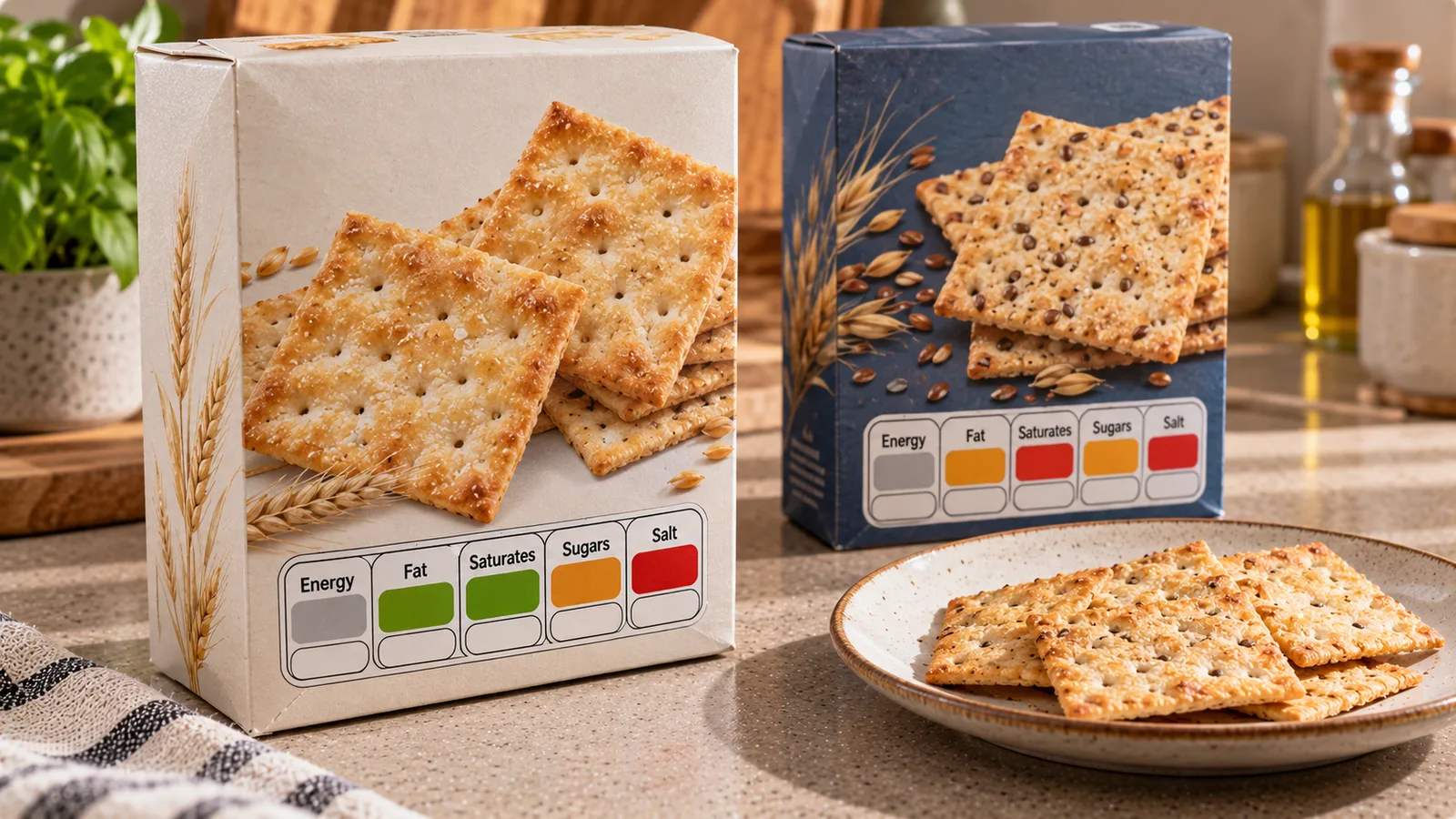
In UK supermarkets, some packaged foods display green, amber and red nutrition indicators on the front of the package. These are commonly called traffic-light nutrition labels.
The colours help shoppers see whether a product contains a low, medium or high amount of particular nutrients. They are intended to make nutrition information easier to understand at a glance.
Unlike a single overall food score, the UK traffic-light system evaluates several nutrients separately. A product can display green for one nutrient, amber for another and red for a third.
Understanding those differences is more useful than treating a package as simply good or bad.
What does a UK traffic-light nutrition label show?
The front-of-pack scheme commonly provides information about:
- Energy, shown in kilojoules and kilocalories.
- Fat.
- Saturated fat.
- Sugars.
- Salt.
Green, amber and red colour coding is applied to fat, saturated fat, sugars and salt.
Energy is shown numerically rather than assigned a traffic-light colour.
The label may also show amounts per portion and percentages of an adult reference intake.
The presentation can vary between manufacturers, and not every packaged food carries a traffic-light label.
What do green, amber and red mean?
| Colour | General meaning | How to interpret it |
|---|---|---|
| Green | Low | The product contains a relatively low amount of that nutrient |
| Amber | Medium | The amount falls between the low and high criteria |
| Red | High | The product contains a relatively high amount of that nutrient |
The colour applies to the specific nutrient, not automatically to the whole food.
For example, a product could be green for sugars, amber for fat and red for salt.
That combination tells you something about its composition, but it does not create a complete nutritional ranking.
The criteria also differ between foods and drinks.
Which nutrients receive traffic-light colours?
Total fat
The fat indicator describes the amount of total fat in the product.
Fat is an energy-containing nutrient, but not all dietary fats have the same nutritional characteristics.
A red fat indicator does not tell you which types of fat dominate the product.
You may need to examine the ingredients and full nutrition declaration for additional context.
Saturated fat
Saturated fat receives its own indicator.
This is useful because two products with similar total fat may have very different saturated-fat contents.
The saturated-fat indicator should not be confused with the total-fat indicator.
Sugars
The sugars indicator refers to the amount of sugars considered under the scheme's criteria.
It is not simply a measure of sugar that a manufacturer has added.
Naturally occurring sugars can also contribute to the declared sugars figure.
For a more complete picture, check the ingredient list and consider the type of food.
Salt
The salt indicator describes salt content.
Two foods with similar calories can have substantially different salt levels.
Salt is therefore worth comparing separately, particularly when choosing between similar packaged products.
How are the colours determined?
The UK scheme uses defined nutrient thresholds.
For ordinary foods, the commonly used low and high thresholds per 100 g include:
| Nutrient | Low (green) | High (red), per 100 g |
|---|---|---|
| Fat | 3 g or less | More than 17.5 g |
| Saturated fat | 1.5 g or less | More than 5 g |
| Total sugars | 5 g or less | More than 22.5 g |
| Salt | 0.3 g or less | More than 1.5 g |
Amber generally represents values between the low and high thresholds.
Important: These figures are not a complete specification of the scheme.
Different thresholds apply to drinks, and certain high-per-portion criteria can also trigger a red indicator.
For that reason, do not attempt to reproduce every official colour classification using only the simplified table above.
The official UK guidance provides the detailed criteria.
Why portions matter
Front-of-pack information often includes values per portion.
A portion is the amount defined for the label. It may not be the amount you actually eat.
Consider a hypothetical snack package containing 150 g, with a labelled portion of 30 g.
If you eat 60 g, you have eaten two labelled portions.
If the label lists 0.4 g salt per 30 g portion, your 60 g serving contains approximately:
0.4 × 2 = 0.8 g salt.
This calculation is independent of whether the salt indicator is green, amber or red.
The colour is a useful visual signal; the numerical amount helps you assess what you consumed.
Per 100 g versus per portion
Both measures are useful, but they answer different questions.
| Measurement | Best use |
|---|---|
| Per 100 g | Comparing similar foods on the same weight basis |
| Per 100 ml | Comparing drinks on the same volume basis |
| Per portion | Estimating the amount in a manufacturer-defined serving |
| Actual amount eaten | Calculating your real intake |
Suppose two cracker products show:
| Product | Salt per 100 g | Labelled portion |
|---|---|---|
| A | 1.0 g | 25 g |
| B | 1.2 g | 15 g |
Product B may show a smaller amount of salt per labelled portion simply because its portion is smaller.
Per 100 g, product A contains less salt.
When comparing products, use the same weight basis first.
Then calculate the quantity you actually plan to eat.
A practical supermarket comparison
Imagine choosing between two packaged snacks.
Product A has:
- Green for sugars.
- Amber for total fat.
- Amber for saturated fat.
- Red for salt.
Product B has:
- Amber for sugars.
- Amber for total fat.
- Green for saturated fat.
- Amber for salt.
Neither product is automatically the correct choice for everyone.
If you specifically want to compare salt content, examine the salt values per 100 g.
If saturated fat is your main comparison point, look at that indicator and its numerical value.
Also consider the portion you expect to eat, the ingredients and the food's role in your overall diet.
This is how the system is most useful: as a starting point for a focused comparison.
Does one red label mean a food is unhealthy?
Not necessarily.
A red indicator means the product is high in that particular nutrient under the scheme's criteria.
It does not mean the food is forbidden, unsafe or unsuitable for every person.
For example, some foods naturally contain relatively large amounts of fat.
A red fat indicator does not provide a complete picture of fatty-acid composition, fiber, protein, vitamins or minerals.
Similarly, several green indicators do not guarantee that a product provides all the nutrients you need.
The colours simplify selected nutrition information; they do not replace a balanced assessment of the food.
Are traffic-light labels mandatory in the UK?
The familiar UK front-of-pack traffic-light format is a voluntary labelling scheme.
This means you should not expect every food package to display the same coloured indicators.
Mandatory nutrition declarations and other food-labelling requirements are a separate matter.
Where a manufacturer uses the traffic-light scheme, the information should follow the applicable guidance.
Because labelling policies can change, consult official UK government sources for the current requirements.
Traffic-light labels versus Nutri-Score
The two systems should not be treated as interchangeable.
| Feature | UK traffic-light labels | Nutri-Score |
|---|---|---|
| Main display | Separate nutrient indicators | One overall letter-and-colour grade |
| Typical colours | Green, amber, red | Five-category colour scale |
| Main purpose | Show selected nutrient levels | Summarise nutritional characteristics through a scoring method |
| Can a product have multiple colours? | Yes, for different nutrients | One overall displayed grade |
| Does it replace the full label? | No | No |
A traffic-light label allows you to identify which nutrient has received which classification.
Nutri-Score uses a different method to produce an overall rating.
Neither system creates a personalised meal plan or tells you exactly how much of a food to eat.
What traffic-light labels do not tell you
The colours do not directly provide a complete assessment of:
- Dietary fiber.
- Protein quality.
- Vitamin and mineral content.
- Ingredient processing.
- Food allergies or intolerances.
- Individual nutritional requirements.
- The balance of your complete meal.
For allergies, read the relevant allergen information.
For a specific nutrient target, use the numerical nutrition declaration.
For ingredients and product composition, examine the ingredient list.
The front-of-pack colours are only one part of the information available.
A simple method for reading the label
When comparing packaged foods:
- Identify the nutrient you want to compare.
- Look at its traffic-light colour.
- Check the actual amount per 100 g or 100 ml.
- Compare similar products on the same basis.
- Check the labelled portion size.
- Calculate the amount you expect to eat.
- Review the full nutrition information when necessary.
This approach avoids two common mistakes: relying entirely on the colours and comparing different manufacturer-defined portions as if they were equal.
Official sources
- UK Government: Front-of-pack nutrition labelling guidance
- NHS: Food labels
- UK Government: Food labelling and packaging
The official scheme's detailed thresholds, portion rules and presentation requirements should be checked against the latest government guidance.
The useful way to interpret the colours
Traffic-light nutrition labels help you identify low, medium and high levels of fat, saturated fat, sugars and salt.
Green, amber and red apply to individual nutrients rather than creating a single verdict about the entire food.
Use the colours to spot differences, compare the numerical values per 100 g and account for the amount you actually eat.